Blog · Live Risk Monitor
Live Risk Monitor Explained: Automatic Stop-Losses for Your Whole Account
A dashboard widget that watches your live Schwab positions and force-closes them the moment a loss threshold is breached. Unlike AI Insights, there's no AI in this one at all — just rules, running continuously in your browser.
August 4, 2026 · 6 min read
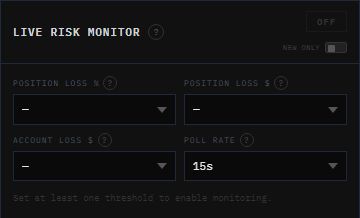
Worth saying up front, since it's easy to assume otherwise given everything else on the dashboard is Claude-powered: Live Risk Monitor doesn't call any AI model. It's a plain polling loop with hard-coded math — which is exactly what you want from something whose job is to pull the trigger on closing a real position. No interpretation, no judgment call, just a threshold check that either has or hasn't been crossed.
What it actually does
Once armed, the widget polls /api/risk-manager/status on a timer — your chosen poll rate, 5 to 30 seconds — which in turn calls the Schwab API for your account balance and every open position: symbol, quantity, market value, average entry price, and asset type (equity vs. option, since options get a 100x multiplier applied to their cost basis). It also pulls today's realized P&L from your closed transactions so the account-wide check reflects the full day, not just what's still open.
Every poll, it runs your open positions through whichever thresholds you've set. The moment one is breached, it fires a real market close order through /api/risk-manager/close-positions — no confirmation prompt, no delay. That's the point: by the time a human would notice and click something, the slippage has often already gotten worse.
The four thresholds
Position Loss %
Closes a single position once its total unrealized value drops this far below its entry cost — a 40% setting closes a $100 position once it's worth $60, no matter when it was opened.
Position Loss $
Same idea, in dollars — closes a position once its unrealized loss from entry exceeds a flat amount. Works independently of, or alongside, the percentage threshold.
Account Loss $
Watches your total daily P&L (realized + unrealized). If it's breached, every open position is closed and the monitor turns itself off.
Poll Rate
How often it re-checks your positions — 5 to 30 seconds. Shorter catches a breach faster but calls the Schwab API more often.
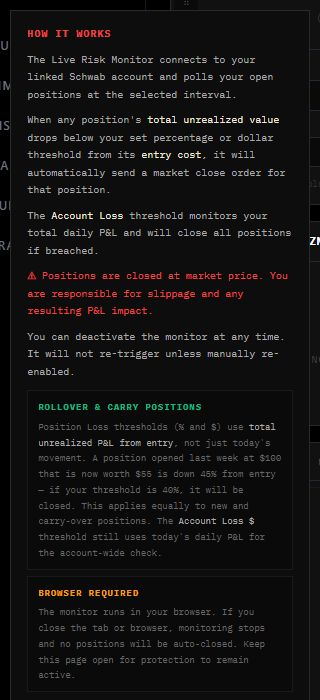
The two Position Loss thresholds and the Account Loss threshold aren't measuring the same thing, and mixing them up matters. Position-level thresholds use total unrealized P&L from entry — a position opened last week at $100 that's now worth $55 is down 45% from entry, full stop, regardless of what it did today. The Account Loss threshold, by contrast, is scoped to today's realized-plus-unrealized P&L only. That distinction is also why carry-over positions from a prior session are monitored identically to ones opened five minutes ago — there's no grace period.
One toggle changes that: New Only. Turn it on before arming and the widget snapshots every symbol you're currently holding, then ignores those specific positions for the rest of the session — only trades opened after that point are eligible to be auto-closed. Useful if you're carrying an intentional swing position you don't want the monitor touching while it protects everything you open today.
Two things that trip people up
Positions close at market price. There's no limit order option here — when a threshold is hit, the order goes out to close at whatever the market will fill it at. In a fast-moving or thin name, the fill can land worse than the threshold implied. That trade-off is deliberate: a limit order that doesn't fill defeats the entire point of an auto-close.
It only runs while the tab is open. This isn't a server-side job — the polling loop lives in your browser. Close the tab, close the browser, or let your laptop sleep, and monitoring stops silently. If you're relying on it, the dashboard needs to stay open on a machine that isn't going anywhere.
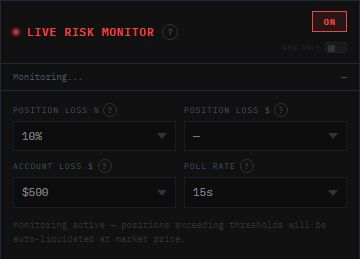
Once it's ON, the threshold dropdowns lock — you can't quietly loosen a stop mid-session without turning monitoring off first, which is a deliberate bit of friction against exactly the kind of in-the-moment rule-bending this widget exists to prevent.
Put a hard floor under your worst day
Live Risk Monitor requires a connected Schwab account, available on Elite.
View Plans & Pricing