Blog · QuantAI vs Tradezella
QuantAI vs Tradezella: Which Trading Journal Actually Changes How You Trade?
Both are trade journals with broker sync, a P&L calendar, and performance analytics — that part of the category is table stakes now. The real question is what happens after the numbers are on screen. QuantAI adds three things most journaling tools, Tradezella included, don't: automatic screen recording tied to every trade, a daily reflection habit that takes under a minute, and a risk tool that can actually close a position for you.
August 5, 2026 · 7 min read
Feature sets change — this reflects QuantAI's product as of publishing and our best understanding of the broader trade-journal category. Worth checking Tradezella's own site for their current feature list before deciding.
| Feature | QuantAI | Most Journals (incl. Tradezella) |
|---|---|---|
| AI trade analysis | Ask Claude Opus open-ended questions about your own trade data, not just fixed stat widgets | Built-in analytics dashboards and stats |
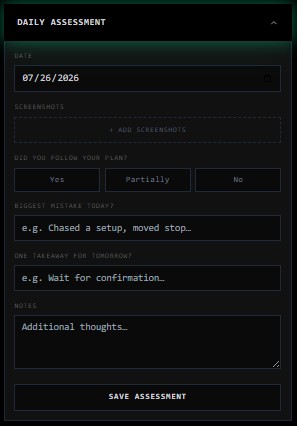
| Daily reflection | Guided Daily Assessment — plan followed, biggest mistake, one takeaway, done in under a minute | Free-form journal / notebook entries |
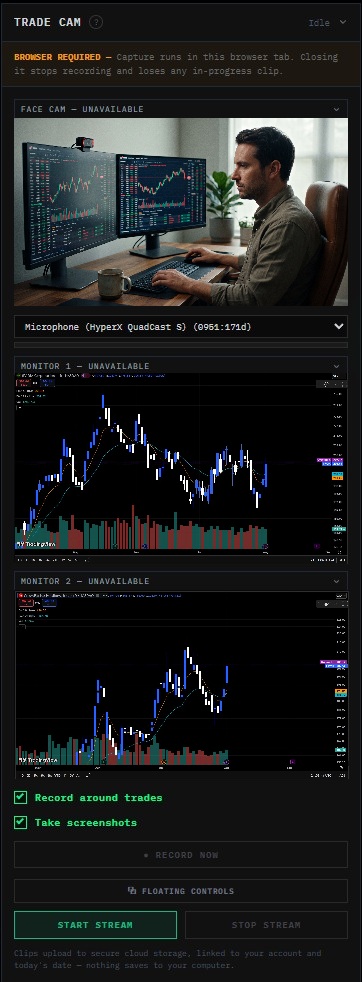
| Screen recording | One-click Trade Cam auto-records your monitors and face cam around every trade — no external software | Not typically offered by trade journals — screenshots and notes only |
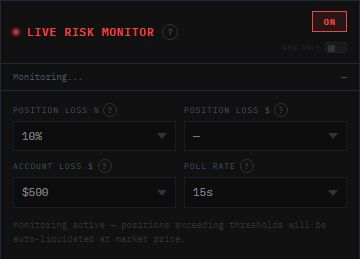
| Live risk automation | Live Risk Monitor can auto-close real positions the moment a loss threshold is breached | Not typically offered — journaling tools are retrospective, not in-the-moment risk control |
1. Trade Cam — screen recording built into the journal
This is the biggest structural difference between the two products. Tradezella, like most trade journals, is built around what you type or paste in after the trade — screenshots, notes, tags. QuantAI's Trade Cam widget records your monitors and face cam automatically around every trade, with no external screen-recorder, no manual clipping, and no upload step — the finished clip is just sitting in your trade history when you check it later.
That matters because the thing most traders actually need to fix isn't visible in a P&L number — it's the 15 seconds before entry where hesitation, chasing, or a size change happened. A screenshot can't show you that. A recording can.
QuantAI
Tradezella
Tradezella screen recording
Screenshot coming soon
2. Daily Assessment — a habit that actually sticks
Most journals leave the reflection step wide open — a blank notebook field you either fill in thoughtfully or skip entirely on a bad day, which is exactly the day the reflection matters most. QuantAI's Daily Assessment is a short, guided form instead: did you follow your plan, what was today's biggest mistake, one takeaway for tomorrow. Three questions, under a minute, every day — the constraint is what makes people actually finish it.
QuantAI
Tradezella
Tradezella journal entry
Screenshot coming soon
3. Live Risk Monitor — enforcement, not just tracking
Journaling tools are retrospective by design — they tell you what happened after the fact. Live Risk Monitor is the one part of QuantAI that isn't: set a position-loss or account-loss threshold, and it polls your live Schwab positions in the background and fires a real market-close order the moment a threshold is breached. No AI involved, no confirmation prompt — just a rule that enforces itself faster than you can second-guess it mid-trade.
Read the full breakdown of how it works for the exact mechanics and thresholds.
QuantAI
Tradezella
Tradezella risk automation
Screenshot coming soon
Where they're actually similar
Broker sync, a P&L calendar, win-rate and expectancy breakdowns, tagging trades by setup — both products cover this well, and if all you need is a place to log trades and see clean stats, either one will do that job. The decision point is really whether you want the journal to stop at analysis, or whether you want it also recording context you'd otherwise lose and actively protecting you on your worst days.
See Trade Cam, Daily Assessment, and Live Risk Monitor for yourself
Starter is free forever — no card required to try the core journal.
View Plans & Pricing